Learn how to create customized branding in Visitly.
Admin role required: Global Admin

Feature availability varies by plan. Check What's in each plan on our pricing page to see if it's included in yours, or talk to our sales team about upgrading.
Customize your device display with Visitly to reflect your business branding. Personalize the logo, background image, and primary color.
Customize Branding
1. Go to Locations and select Edit on the desired location.
2. Select Look and Feel from the left-hand panel.
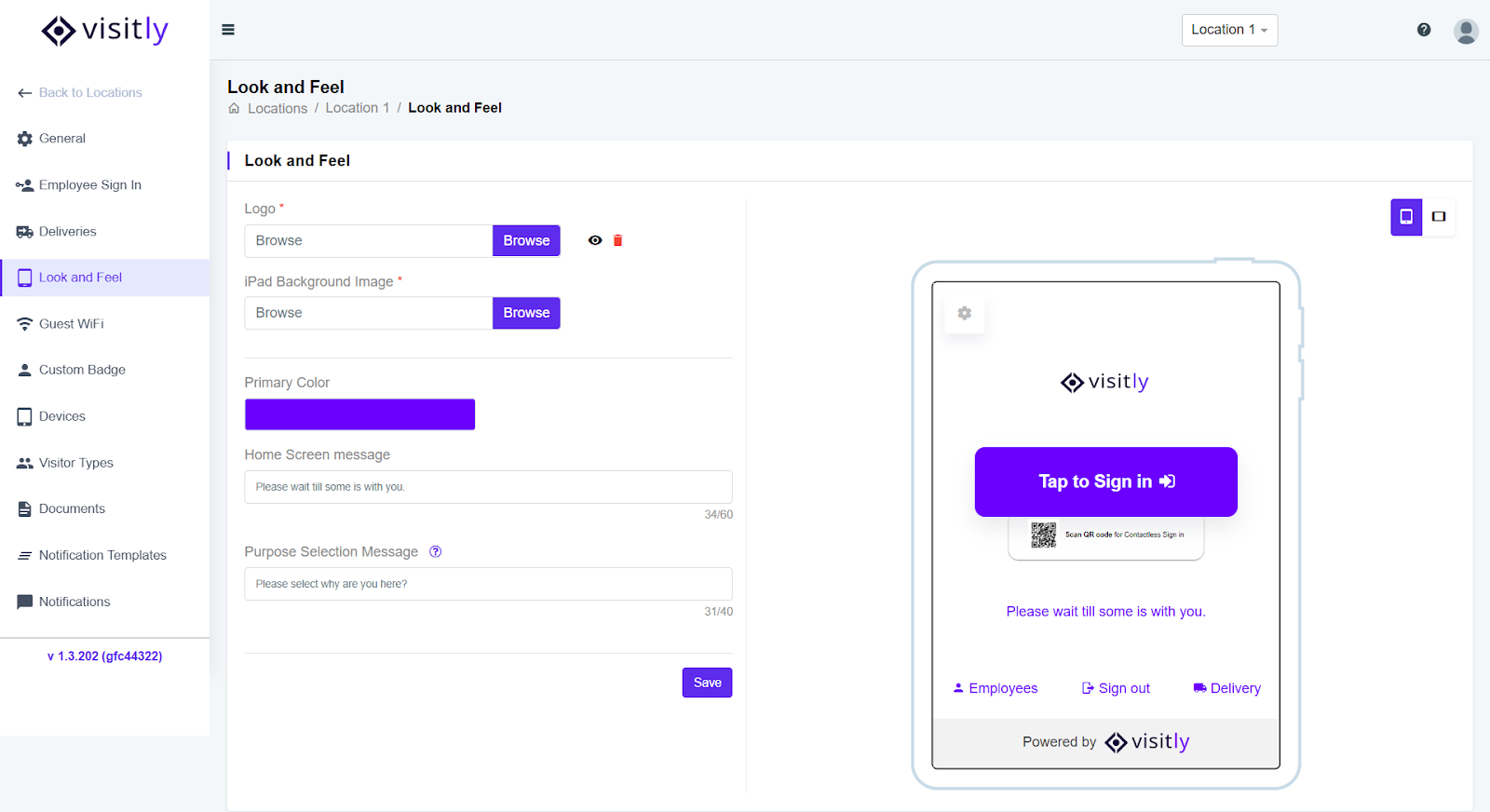
3. In the Logo field, click Browse to upload your logo.
4. Click Browse in the Background Image field to add an image.
⭐ Note: Supported formats include JPG, JPEG, PNG, GIF, TIFF, and TIF.
5. Choose a Primary Color to match your brand.
6. Add a Home Screen Message to greet visitors.
7. Customize the Purpose Selection Message that visitors see when selecting the reason for their visit.
8. Click Save to apply your updates.
Your device display is now customized to showcase your branding, delivering a unique and professional Visitly experience!
Was this article helpful?
That’s Great!
Thank you for your feedback
Sorry! We couldn't be helpful
Thank you for your feedback
Feedback sent
We appreciate your effort and will try to fix the article